
Free Trading Journal for Stocks, Options & Futures
Know your trades. Master your edge.
Import your broker CSV and see your real P&L, win rate and drawdown in minutes. Tag your setups, find your mistakes and get a plan for tomorrow. Free for 6 months. No credit card.
- ✓ 6 months free
- ✓ No credit card
- ✓ Import in minutes
- ✓ Export your data any time

6 months of OptiqJournal, free
- Sign up with your email. No card needed.
- Confirm your email. Your 6 months start now and the dashboard counts the days down.
- Import and review. Everything below is included.
After 6 months you keep access to your history and can export it. Paid plans will be announced before then, and you are never charged unless you choose one.
Import from your broker
Drop in a CSV export and your executions become trades. Scale-ins, partial exits, shorts, options and futures are paired for you, and re-importing never creates duplicates.
Know your real numbers
Net P&L, win rate, profit factor, expectancy, average win and loss, drawdown and a single score, calculated from your actual fills.
Trading calendar
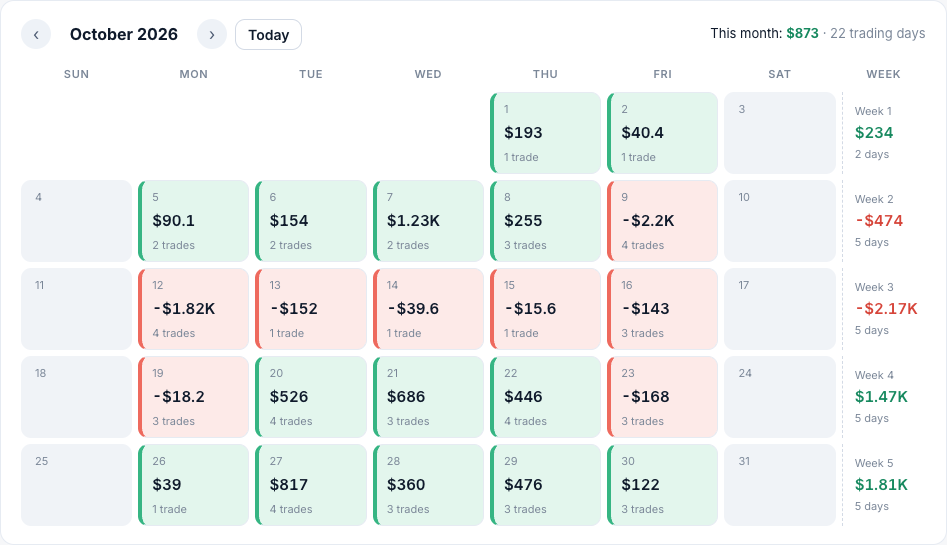
See every trading day at a glance, with weekly totals, then click a day to open its trades.
Uncover your mistakes
Tag setups and mistakes, rate each trade, attach screenshots and write a plan and review for each day.
Find your edge
Break results down by weekday, entry hour, symbol and setup to see where you make and lose money.
Your data stays yours
Each account is separate. Export everything or delete it whenever you like.
A free trading journal for day traders and options traders
Whether you scalp futures, trade options or swing stocks, OptiqJournal works as a trading performance tracker that grows with your account: import once, then keep adding files.
Works with the brokers you already use
Don't see yours? Any CSV with a symbol, side, quantity, price and time can be imported with column mapping.
Up and running in three steps
- Export your trades from your broker as a CSV.
- Import the file. Pick your broker or let us detect it.
- Review your dashboard and start tagging trades.
Need help exporting? Read the thinkorswim or Fidelity export guide. New to journaling? Start with the trading journal template or how to journal options trades.
Claim your free accessLimited-time launch offer · No payment or credit card required during the promotion · Paid plans will be announced before your free period ends, and you are never charged unless you choose one.
A free trading journal for how you trade
Free trading journal
Most traders know they should keep a journal and quit because typing every trade is tedious.
Learn more →Options trading journal
Options results are easy to misjudge: each contract is worth 100 shares, positions expire, and commissions are charged per contract.
Learn more →Day trading journal
Day trading results come from habits: when you trade, how often, and what you do after a loss.
Learn more →Trading performance tracker
A performance tracker is only useful if you trust its numbers.
Learn more →Trading journal guides
Win rate vs risk-reward: the break-even math
How win rate and risk-reward ratio work together. The break-even win rate formula, worked examples, and how to read your own numbers in a journal.
What is a trading journal and why keep one?
A trading journal is a structured record of your trades and the reasons behind them. Learn what to put in it, why it works, and how to start in five minutes.
Trading journal template: what to record
A simple trading journal template: the fields to record for each trade, a daily plan and review, and the setups, mistakes and tags that make stats useful.
Frequently asked questions
Is OptiqJournal really free?
Yes. Every new account gets 6 months of free access starting when you confirm your email. No credit card is needed and nothing is charged automatically. Paid plans will be announced before your free period ends, and you are never charged unless you choose one.
Which brokers can I import from?
thinkorswim, Interactive Brokers, Robinhood, Webull and Fidelity (including Active Trader Pro) are recognised automatically. For TradeStation, Tradier and any other broker, upload a CSV with a symbol, side, quantity, price and time and map the columns once.
Does it support options and futures?
Yes. Stocks, options (100x contract multiplier) and futures (contract multipliers) are supported, including scale-ins, partial exits and short positions. Forex and crypto are not supported yet.
How is my profit and loss calculated?
Your fills are paired into trades using the average entry price, so scaling in and out works. Fees come from your file where it has them, or from the fee settings you choose. Compare the totals with your broker statement: that is always the official record.
Does OptiqJournal connect to my broker account?
No. You export a CSV file yourself and upload it. We never ask for your broker login or API keys.
Is my trading data private?
Each account is stored separately and only visible when you are logged in. We do not sell your data. You can export everything or delete it at any time. See the privacy policy for details.
What is the Coach tab?
It reviews a trading day against your own recent history and suggests a plan for the next day, for example a trade limit or an hour to avoid. It uses fixed rules on your numbers, not artificial intelligence, and it is not investment advice.